Cloud Workloads: Types, Common Tasks, and Security Best Practices
A cloud workload refers to the computing resources and tasks that are required to run an application or service in a cloud computing environment. This can include resources such as virtual machines, storage, and networking, as well as the software and applications that run on those resources.
What Is a Cloud Workload?
Cloud workloads are typically managed and scaled using cloud-native tools and services, such as Kubernetes, a container orchestrator, or tools provided by cloud providers like Amazon Web Services, Microsoft Azure, and Google Cloud.
Cloud workloads are rapidly growing – over 504 million workloads were deployed in 2021, up by 48% in two years. The most common deployment model is software as a service (SaaS), used for 76% of all workloads. Next up are infrastructure as a service (IaaS) with 15% of workloads, and platform as a service (PaaS) with 9% of workloads.
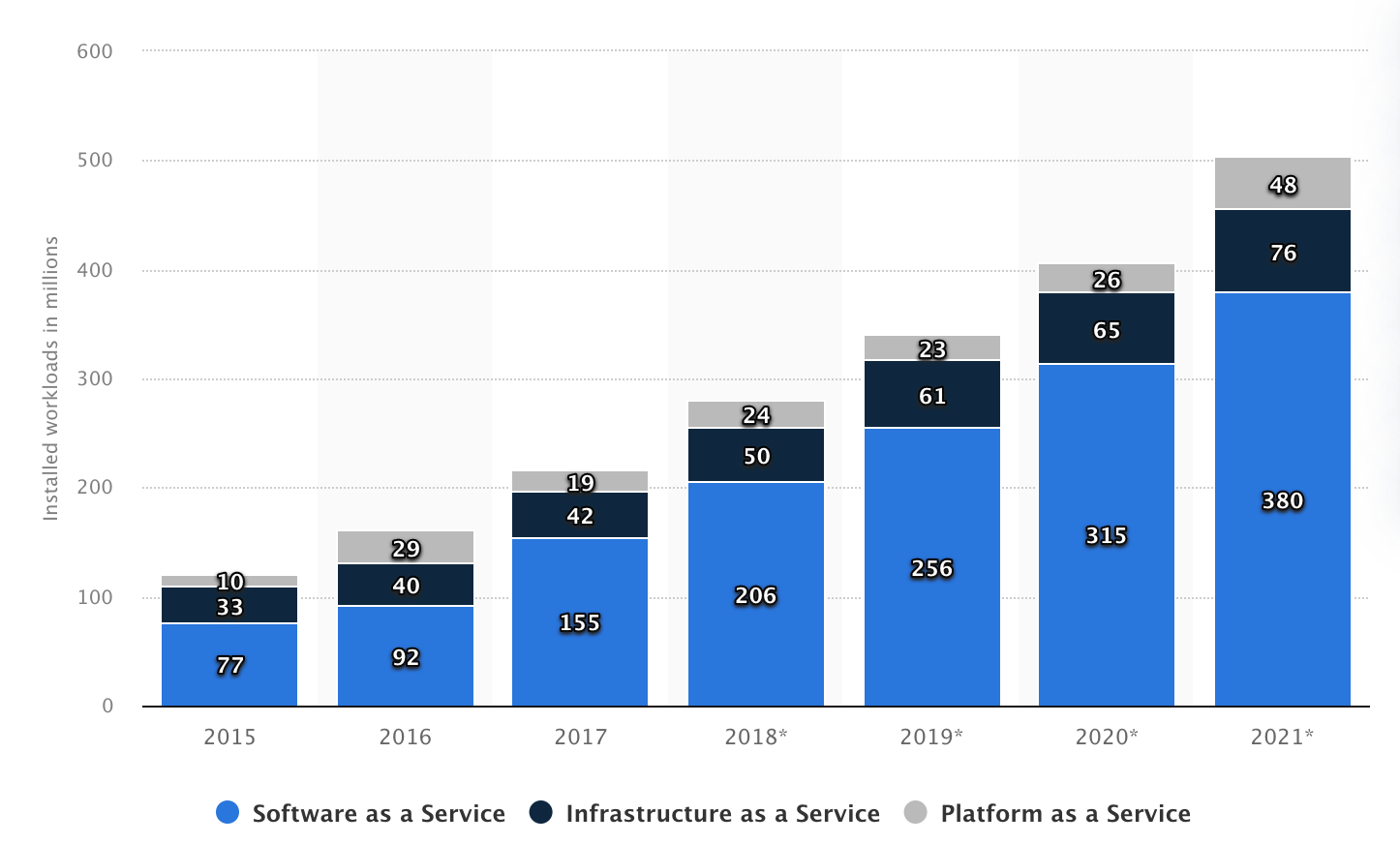
Image Source: Statista
This is part of a series of articles about cloud security.
In this article:
- Types of Workloads in the Cloud
- Classifying Workloads by Cloud Deployment Model
- Classifying Workloads by Cloud Native Technology
- Classifying Workloads by Usage Patterns
- Classifying Workloads by Resource Requirements
- What Kind of Tasks Are Suitable for Cloud Workloads?
- Containerization
- High Availability Storage
- Machine Learning and Artificial Intelligence
- Real-time Analytics
- Web Content Hosting
- Cloud Workload Security Challenges
- 7 Best Practices for Cloud Workload Security
Types of Workloads in the Cloud
Classifying Workloads by Cloud Deployment Model
There are three main types of cloud workloads, classified according to the cloud deployment model:
- Infrastructure as a Service (IaaS): IaaS is a cloud computing model where the cloud provider offers virtualized computing resources, such as virtual machines (VMs), storage, and networking, over the internet. IaaS is suitable for hosting and managing infrastructure-level workloads, such as operating systems, databases, and storage.
- Platform as a Service (PaaS): PaaS is a cloud computing model that provides a platform for developing, running, and managing applications, without having to worry about the underlying infrastructure. PaaS is suitable for hosting and managing application-level workloads, such as web and mobile applications.
- Software as a Service (SaaS): SaaS is a cloud computing model where the cloud provider offers a complete software solution over the internet, typically on a subscription basis. SaaS is suitable for hosting and managing software-level workloads, such as email, customer relationship management (CRM), and human resource management (HRM) systems.
Each of these cloud deployment models provides different levels of control and customization to organizations, and choosing the right one depends on the specific requirements of the workloads being hosted.
Classifying Workloads by Cloud Native Technology
There are several technical approaches commonly used to run workloads in a cloud environment. These include:
- Virtual Machines (VMs): A software-based emulation of a physical server or computer that allows multiple operating systems to run on a single physical host. Cloud providers offer VMs as a service, which enables users to create, run, and manage VMs in the cloud.
- Containers: A lightweight and portable way to package and deploy applications. Containers provide isolation between applications and their dependencies, allowing them to run consistently across different environments.
- Container as a Service (CaaS): A cloud-based service that provides a fully managed container environment. CaaS platforms abstract the underlying infrastructure and provide developers with an easy-to-use interface for deploying and managing containers. Popular CaaS platforms include AWS Fargate, Azure Container Instances, and Google Cloud Run.
- Serverless: Serverless computing, also known as Function as a Service (FaaS), allows developers to write and deploy code without worrying about the underlying infrastructure. Serverless platforms automatically scale up or down to handle traffic spikes, and users only pay for the computing resources used while the function is running.
Classifying Workloads by Usage Patterns
There are several different types of cloud workloads based on usage patterns and resource requirements. Cloud workloads can be broadly categorized based on usage patterns as:
- Static workloads: These are applications and services that have a consistent, predictable workload and are typically running 24/7. Examples include web servers and email services.
- Periodic workloads: These are applications that have regular, recurring usage patterns, such as data backups or batch processing.
- Inconsistent workloads: These are applications that have varying and unpredictable workloads, such as gaming platforms, eCommerce sites, or applications that experience spikes in traffic.
Classifying Workloads by Resource Requirements
It is also common to classify cloud workloads by their resource requirements:
- Standard compute workloads: These workloads have a general-purpose resource requirement and can include tasks such as web hosting, software development, and test and development environments.
- High CPU workloads: These require powerful central processing units (CPUs) for tasks such as scientific simulations, data analytics, and batch processing.
- High GPU workloads: These require powerful graphics processing units (GPUs) for demanding tasks such as computer-aided design (CAD), scientific simulations, and video rendering.
- High performance computing (HPC) workloads: These are workloads that require massive parallel computing, which is supported by large clusters of cloud-based machines.
- Storage-optimized workloads: These require large amounts of storage capacity and high input/output (I/O) performance for tasks such as big data analytics, content management, and backups.
- Memory-intensive workloads: These require large amounts of memory for tasks such as in-memory databases, real-time analytics, and caching.
What Kind of Tasks Are Suitable for Cloud Workloads?
Cloud workloads can support various types of computing tasks. Here are some examples of applications and tasks that can benefit from cloud computing:
Containerization
Cloud platforms provide an ideal environment for running containers and microservices, allowing organizations to deploy and manage applications more efficiently. The cloud also provides automatic scaling and load balancing capabilities, ensuring that applications are always available and performant.
High Availability Storage
Cloud platforms provide highly available and scalable storage solutions for storing and accessing large amounts of data, with built-in data protection and disaster recovery features. This eliminates the need for organizations to invest in expensive storage infrastructure, and ensures that data is always available and protected.
Machine Learning and Artificial Intelligence
Cloud platforms provide access to high-performance computing resources and large amounts of data for training machine learning models and running AI applications. The cloud also allows for easy scaling of resources as needed, making it a cost-effective solution for organizations with varying workload requirements.
Real-time Analytics
Cloud platforms can provide the processing power and scalability needed to support real-time data analytics and business intelligence. The cloud also provides easy access to big data software like Hadoop and Spark, which is complex to deploy on-premises, and can connect to a wide range of data sources, making it possible to perform complex data analysis and modeling.
Web Content Hosting
Cloud platforms provide a scalable and highly available infrastructure for hosting websites and web applications, with automatic failover and load balancing capabilities. This eliminates the need for organizations to invest in expensive hardware and IT infrastructure, and allows them to focus on delivering high-quality web content and services to their customers.
Cloud Workload Security Challenges
Security is a major concern when it comes to cloud workloads, as organizations are placing their sensitive data and applications in the hands of a third-party provider. Cloud workload security challenges refer to the potential risks and vulnerabilities that arise when running workloads on cloud computing platforms. Some of the major risks include:
- Data breaches: Data stored in the cloud can be vulnerable to theft, unauthorized access, and hacking. This can happen as a result of weak passwords, unpatched software vulnerabilities, or a lack of proper access controls.
- Configuration errors: Misconfigurations of cloud resources can lead to security vulnerabilities and data breaches. For example, leaving ports open or misconfiguring firewall settings can allow unauthorized access to cloud resources.
- Insider threats: Malicious actors within a company can access and steal sensitive data stored in the cloud. This can include employees, contractors, or third-party service providers.
- Multi-tenancy: Sharing infrastructure with other organizations in the public cloud can increase the risk of security breaches. If one customer’s data or resources are compromised, this can affect other customers who share the same infrastructure.
7 Best Practices for Cloud Workload Security
Here are some best practices for managing cloud workloads:
- Use monitoring and logging: Use monitoring and logging tools to track the performance and health of your applications, and to troubleshoot issues that arise.
- Use policy as code: Use containers to package and deploy your applications, and use infrastructure as code (IaC) techniques to enforce security policies consistently and automatically.
- Implement access control: Use cloud-based identity and access management (IAM) services to implement strict access control policies for sensitive resources.
- Use encryption: Encrypt sensitive data in transit and at rest.
- Perform security assessments: Conduct regular security assessments and penetration testing to identify and address vulnerabilities.
- Backup and disaster recovery: Regularly backup your data and applications, and have a disaster recovery plan in place in case something goes wrong.
- Governance and compliance: Implement governance controls and compliance policies to ensure that your organization meets legal and regulatory requirements. Work with a trusted cloud provider that offers robust security features and complies with industry standards, such as ISO 27001 and SOC 2.
Cloud Workload Security with Aqua
The Aqua Platform provides robust, comprehensive protection of hybrid and multi-cloud environments and running workloads. It includes several solutions to secure cloud workloads:
- Aqua CSPM+ continuously scans your cloud infrastructure and running workloads, allowing you to efficiently identify, prioritize, and remediate the most critical risks and rapidly prove regulatory compliance.
- Aqua Cloud Workload Protection (CWPP) provides visibility into cloud workloads, can identify and prioritize vulnerabilities and other risks, and uses behavioral detection and anti-malware techniques to protect runtime workloads from an attack.
Aqua Cloud Native Application Protection Platform (CNAPP)
Go cloud native with the experts!